自由落下運動のシミュレート
ボールに見立てた円図形をJavaScriptで書いてみる。最初は上下だけの自由落下運動。手に握った野球の球を放し、地面に落とすイメージ。
まず、簡単なHTMLファイルを用意。
<!DOCTYPE html PUBLIC "-//W3C//DTD XHTML 1.0 Transitional//EN" "http://www.w3.org/TR/xhtml1/DTD/xhtml1-transitional.dtd">
<html xmlns="http://www.w3.org/1999/xhtml">
<head>
<meta charset=UTF-8">
<title>自由落下運動と放物運動のシミュレート</title>
</head>
<body>
<canvas id="canvas"></canvas>

<script type="text/javascript" src="./main.js"></script>
</body>
</html>
次に、ボールのスクリプト部分が以下。
class Main {
	constructor() {
		this._canvas;
		this._context;
		this._timer;

		// ①各パラメータ
		this._v = 0.0;	// 初速度
		this._y = 15;	// ボールの中心
		this._a = 9.8;	// 重力(加速度)
		this._t = 0.2;	// 時間
		this._e = -0.8;	// 反発係数

		this._init();
	}

	_init() {
		this._canvas = document.getElementById("canvas");
		this._canvas.width = 200;
		this._canvas.height = 500;
		this._context = this._canvas.getContext("2d");

		// ②タイマーを開始し、_darw()を20ミリ秒間隔で呼び出し
		this._timer = setInterval(this._draw.bind(this), 20);
	}

	_draw() {
		// ③速度と位置を更新
		this._v = this._v + this._a + this._t;
		this._y = this._y + this._v * this._t + 0.5 * this._a * this._t * this._t;

		// ④地面との衝突処理
		if (this._y > this._canvas.height - 15) {
			this._y = this._canvas.height - 15;
			this._v = this._v * this._e;
		}

		// ⑤キャンバスを白紙に戻す
		this._context.fillStyle = "rgba(255, 255, 255, 0.2)";
		this._context.rect(0, 0, 200, 500);
		this._context.fill();

		// ⑥ボールの描画処理
		this._context.beginPath();
		this._context.fillStyle = "#000000";
		this._context.arc(100, this._y, 15, 0, 360 * Math.PI / 180);
		this._context.fill();
	}
}

let run = new Main();
①、必要となる物理のパラメータ。反発係数はボールが地面に衝突した時のバウンドの力。
②、setInterval()で画面更新を担当する_draw()を、20ミリ秒で呼び出すよう設定。
③、落下による時間経過と共に変化するボールの速度、位置を計算している。加速と位置を計算する式は以下。
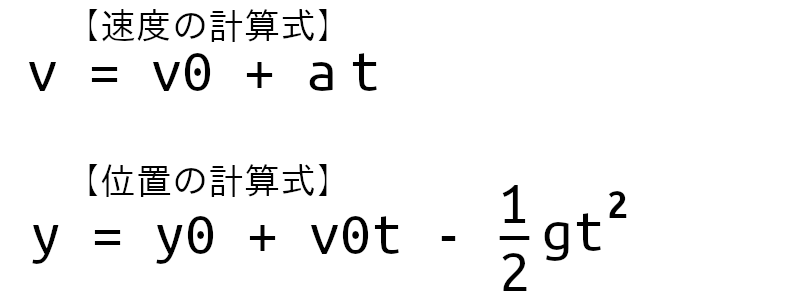
vやyの0は運動を観察し始めた時という意味。
④、ボールがキャンバスの最下部に到達したら、速度に反発係数をかけバウンドさせる。
⑤、ボールを再描画する直前にキャンバスを白紙に戻す。そうしないと以前描画したボールが残るため。アルファ値を0.2に設定してボールの軌跡が見えるようにした。
⑥、計算したy座標を元に、arc()で円を描画。
放物運動をシミュレート
次に、自由落下運動にx軸方向の動きを加えた放物運動をシミュレートしてみる。HTMLファイルは同じものを使用。
class Main {
	constructor() {
		this._canvas;
		this._context;
		this._timer;

		// ①各パラメータ
		this._vx, this._vy;	// 初速度
		this._x, this._y;	// ボールの中心
		this._a = 9.8;		// 重力(加速度)
		this._t = 0.2;		// 時間
		this._e = -0.8;		// 反発係数

		this._init();
	}

	_init() {
		this._canvas = document.getElementById("canvas");
		this._canvas.width = 600;
		this._canvas.height = 400;
		this._context = this._canvas.getContext("2d");

		// ②ボールの初速度の設定
		this._vx = 3;
		this._vy = -100;

		// ③ボールの初期位置の設定
		this._x = 0;
		this._y = this._canvas.height;

		// 最初のボールを描画
		//this._context.arc(this._x, this._y, 10, 0, 360 * Math.PI / 180);

		this._timer = setInterval(this._draw.bind(this), 20);
	}

	_draw() {
		// ④x方向の等速度運動
		this._x = this._x + this._vx;
		this._vy = this._vy + this._a * this._t;
		this._y = this._y + this._vy * this._t + 0.5 * this._a * this._t * this._t;

		if (this._y > this._canvas.height - 15) {
			this._y = this._canvas.height - 15;
			this._vy = this._vy * this._e;
		}

		this._context.fillStyle = "rgba(255, 255, 255, 0.2)";
		this._context.rect(0, 0, 600, 400);
		this._context.fill();

		this._context.beginPath();
		this._context.fillStyle = "#000000";
		this._context.arc(this._x, this._y, 15, 0, 360 * Math.PI / 180);
		this._context.fill();
	}
}

let run = new Main();
①、放物運動は横移動もあるため、速度をvを_vx、_vyの2つにする。
②、x、y軸方向の初速度を設定。_vx値が大きいほど右へ、_vy値が大きいほど上へ上がる。
③、キャンバスの左下隅にボールを配置。
④、自由落下運動ではy軸方向だけ計算したが、今回はx軸方向も計算する。ボールが横に動く運動は一定の速度にしている。こういった動きを等速度運動という。時間tにおけるx軸方向のボール位置は以下の式で求められる。

今回、x軸方向は等速度運動のため、_vxに時間は掛けていない。

コメント